ChatStorage
Visualizing ChatStorage
I wanted to share a quick look at ChatStorage and the core idea behind it. The illustration below shows a simplified view of how it all connects, focusing on modern messaging platforms.
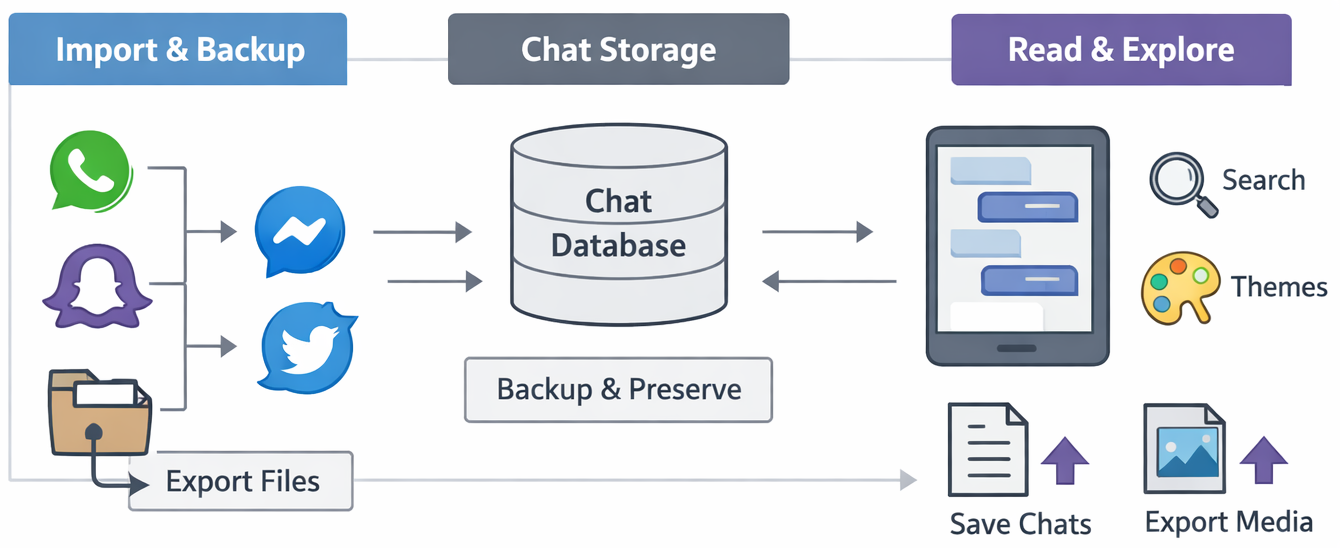
At the heart of ChatStorage is a flexible importer framework. Each importer reads exported chats from a specific platform and converts them into a common internal format. Right now, it can handle WhatsApp like exports. Facebook Messenger data and other chat formats are planned to add later. The framework is designed to make adding new importers simple, so any future chat platform could be integrated with minimal effort.
All imported chats feed into a central SQLite database, which stores messages, timestamps, emojis, usernames, and media references in a structured, platform-independent way. This keeps the chat history intact and portable.
On top of that sits the Chat Reader UI, rendering chats in a familiar messenger-like interface. It supports text, emojis, images, timestamps, and even basic theme customization.
The illustration shows how the components connect: importers feed the database, which powers the Chat Reader UI, and optional export/theme options sit at the end.
This is still early work. Most of the effort so far has been in building the database and making messages readable across platforms. Future devlogs will explore richer imports, UI improvements, and possibly theme or fake chat features for demos.
Leave a comment
Log in with itch.io to leave a comment.